

For kali linux
Default Username :root
Default Password : toor
Yes! As you switched on the kali linux in virtual machine you must have seen the a new environment different from windows and similar to Mac OS.
In linux we do all the task from terminal though there is icons and applications like windows still hackers prefer to be command line interface(cli).You will soon get to know about later!
So here are few commands you need to remember!
| File Commands | ||
| 1. | ls | Directory listing |
| 2. | ls -al | Formatted listing with hidden files |
| 3. | ls -lt | Sorting the Formatted listing by time modification |
| 4. | cd dir | Change directory to dir |
| 5. | cd | Change to home directory |
| 6. | pwd | Show current working directory |
| 7. | mkdir dir | Creating a directory dir |
| 8. | cat >file | Places the standard input into the file |
| 9. | more file | Output the contents of the file |
| 10. | head file | Output the first 10 lines of the file |
| 11. | tail file | Output the last 10 lines of the file |
| 12. | tail -f file | Output the contents of file as it grows,starting with |
| the last 10 lines | ||
| 13. | touch file | Create or update file |
| 14. | rm file | Deleting the file |
| 15. | rm -r dir | Deleting the directory |
| 16. | rm -f file | Force to remove the file |
| 17. | rm -rf dir | Force to remove the directory dir |
| 18. | cp file1 file2 | Copy the contents of file1 to file2 |
| 19. | cp -r dir1 dir2 | Copy dir1 to dir2;create dir2 if not present |
| 20. | mv file1 file2 | Rename or move file1 to file2,if file2 is an existing |
| directory | ||
| 21. | ln -s file link | Create symbolic link link to file |
| Process management | ||
| 1. | ps | To display the currently working processes |
| 2. | top | Display all running process |
| 3. | kill pid | Kill the process with given pid |
| 4. | killall proc | Kill all the process named proc |
| 5. | pkill pattern | Will kill all processes matching the pattern |
| 6. | bg | List stopped or background jobs,resume a stopped |
| job in the background | ||
| 7. | fg | Brings the most recent job to foreground |
| 8. | fg n | Brings job n to the foreground |
File permission
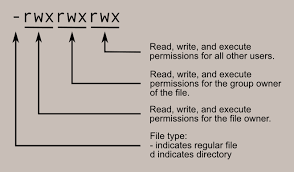
| 1. | chmod octal file | Change the permission of file to octal,which can | ||
| be found separately for user,group,world by | ||||
| adding, | ||||
| • | 4-read(r) | |||
| • | 2-write(w) | |||
| • | 1-execute(x) | |||
Searching
| 1. | grep pattern file | Search for pattern in file |
| 2. | grep -r pattern dir | Search recursively for pattern in dir |
| 3. | command | grep | Search pattern in the output of a command |
| pattern | ||
| 4. | locate file | Find all instances of file |
| 5. | find . -name filename | Searches in the current directory (represented by |
| a period) and below it, for files and directories with | ||
| names starting with filename | ||
| 6. | pgrep pattern | Searches for all the named processes , that |
| matches with the pattern and, by default, returns | ||
| their ID | ||
System Info
| 1. | date | Show the current date and time |
| 2. | cal | Show this month’s calender |
| 3. | uptime | Show current uptime |
| 4. | w | Display who is on line |
| 5. | whoami | Who you are logged in as |
| 6. | finger user | Display information about user |
| 7. | uname -a | Show kernel information |
| 8. | cat /proc/cpuinfo | Cpu information |
| 9. | cat proc/meminfo | Memory information |
| 10. | man command | Show the manual for command |
| 11. | df | Show the disk usage |
| 12. | du | Show directory space usage |
| 13. | free | Show memory and swap usage |
| 14. | whereis app | Show possible locations of app |
| 15. | which app | Show which applications will be run by default |
Compression And Decompression
| 1. | tar cf file.tar file | Create tar named file.tar containing file |
| 2. | tar xf file.tar | Extract the files from file.tar |
| 3. | tar czf file.tar.gz files | Create a tar with Gzip compression |
| 4. | tar xzf file.tar.gz | Extract a tar using Gzip |
| 5. | tar cjf file.tar.bz2 | Create tar with Bzip2 compression |
| 6. | tar xjf file.tar.bz2 | Extract a tar using Bzip2 |
| 7. | gzip file | Compresses file and renames it to file.gz |
| 8. | gzip -d file.gz | Decompresses file.gz back to file |
Network Management
| 1. | ping host | Ping host(ip address or website) and output results |
| 2. | whois domain | Get whois information for domains |
| 3. | dig domain | Get DNS information for domain |
| 4. | dig -x host | Reverse lookup host |
| 5. | wget file | Download file |
| 6. | wget -c file | Continue a stopped download |
| Terminal Operations | ||
| 1. | ctrl+c | Halts the current command |
| 2. | ctrl+z | Stops the current command, resume with fg in the |
| foreground or bg in the background | ||
| 3. | ctrl+d | Logout the current session, similar to exit |
| 4. | ctrl+w | Erases one word in the current line |
| 5. | ctrl+u | Erases the whole line |
| 6. | ctrl+r | Type to bring up a recent command |
| 7. | !! | Repeats the last command |
| 8. | exit | Logout the current session |
Happy Coding..!
And i know you wern’t familiar with coding but trust me … in Linux you can start all new world of coding even if u dint know any programming language this could be your kick starter and believe anyone could code in Linux!
 Cyber Journal